
Analysis Builder
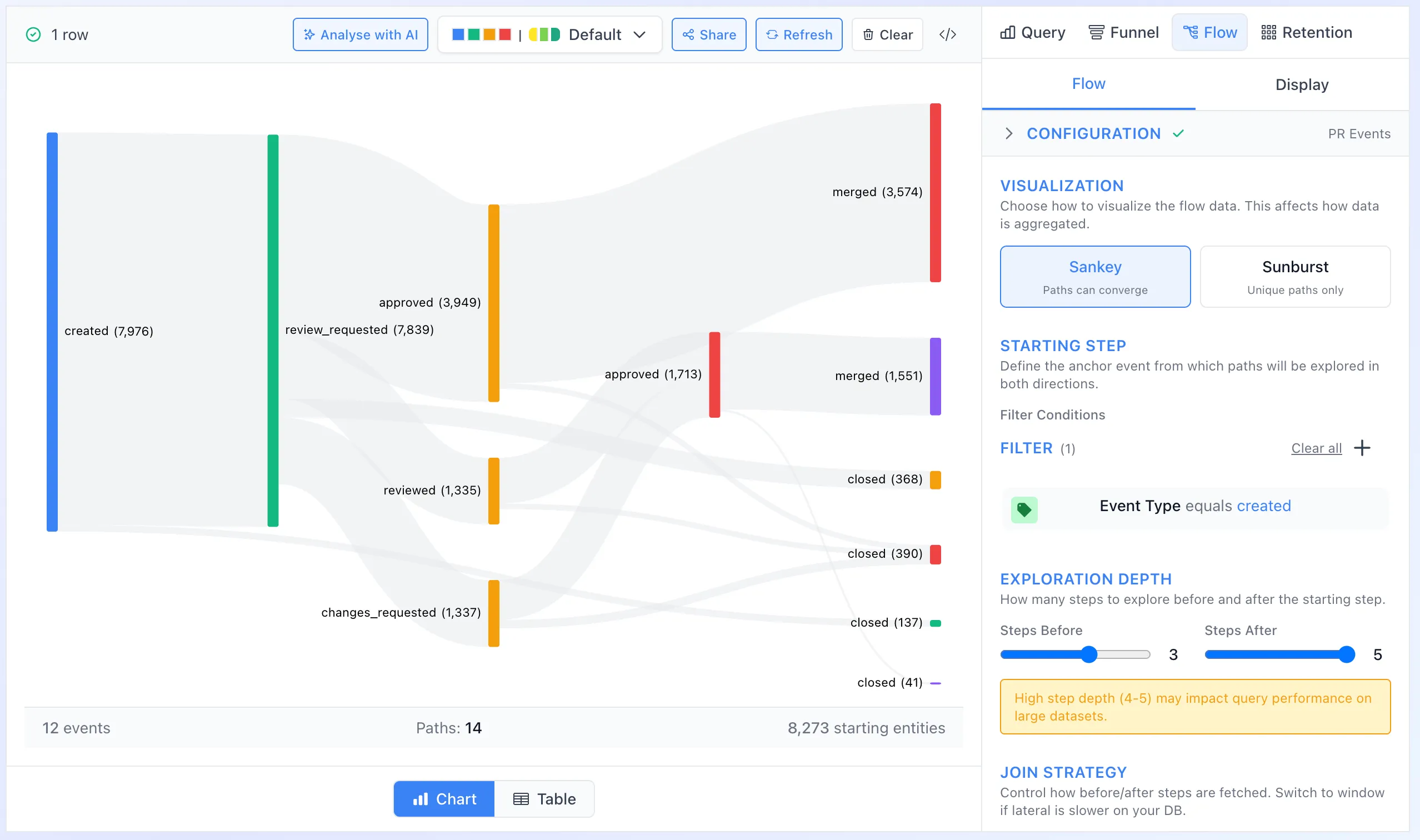
The AnalysisBuilder is a modern query builder component that provides an intuitive interface for exploring and visualizing data from your semantic layer. Auto-execute queries, AI-powered natural language generation, and shareable URLs—all in a clean split-panel layout.
- Dashboards — Embed analytics dashboards
- Funnel Analysis — Track user journeys
- Charts — Visualization components
- Theming — Customize appearance
- AnalysisConfig — Config reference
- Quick Start — Get started fast
Key Features
Section titled “Key Features”- Split Layout: Results panel on the left (large), query builder on the right
- Metrics & Breakdowns: Add measures and dimensions to build queries
- Filters: Apply filters with a visual filter builder
- Auto-Execute: Queries run automatically as you make changes
- Smart Chart Selection: Automatically suggests appropriate chart types
- AI Integration: Optional AI-powered natural language query generation
- Shareable URLs: Share analysis via URL hash parameters
- Local Storage Persistence: Remembers your last analysis
Installation
Section titled “Installation”npm install drizzle-cube react react-dom recharts react-grid-layoutBasic Usage
Section titled “Basic Usage”import { CubeProvider, AnalysisBuilder } from 'drizzle-cube/client';
function App() { return ( <CubeProvider apiOptions={{ apiUrl: '/api/cubejs-api/v1' }}> <AnalysisBuilder maxHeight="calc(100vh - 64px)" /> </CubeProvider> );}Import Options
Section titled “Import Options”// Full client importimport { AnalysisBuilder } from 'drizzle-cube/client';
// Components-only import (smaller bundle)import { AnalysisBuilder } from 'drizzle-cube/client';| Prop | Type | Default | Description |
|---|---|---|---|
className | string | - | Additional CSS classes |
maxHeight | string | - | Maximum height (e.g., '800px', '100vh', 'calc(100vh - 64px)') |
initialQuery | CubeQuery | - | Initial query to load |
initialChartConfig | object | - | Initial chart configuration for editing existing portlets |
initialData | any[] | - | Initial data to display (avoids re-fetching when editing) |
colorPalette | ColorPalette | - | Color palette for chart visualization |
disableLocalStorage | boolean | false | Disable localStorage persistence |
hideSettings | boolean | false | Hide the settings button |
onQueryChange | (query: CubeQuery) => void | - | Callback when query changes |
onChartConfigChange | (config) => void | - | Callback when chart config changes |
Ref Methods
Section titled “Ref Methods”Access the component’s methods via a ref:
import { useRef } from 'react';import { AnalysisBuilder, AnalysisBuilderRef } from 'drizzle-cube/client';
function App() {  const builderRef = useRef<AnalysisBuilderRef>(null);
  const handleExport = () => {    const query = builderRef.current?.getCurrentQuery();    console.log('Current query:', query);  };
  return (    <>      <AnalysisBuilder ref={builderRef} />      <button onClick={handleExport}>Export Query</button>    </>  );}
Available Methods
Section titled “Available Methods”| Method | Return Type | Description |
|---|---|---|
getCurrentQuery() | CubeQuery | Get the current query object |
getChartConfig() | { chartType, chartConfig, displayConfig } | Get current chart configuration |
executeQuery() | void | Execute the current query |
clearQuery() | void | Clear the current query |
Building a Query
Section titled “Building a Query”Adding Metrics
Section titled “Adding Metrics”Metrics are measures (aggregations) from your cubes. Click “Add Metric” to open the field search modal:
// Query with two metrics{ measures: ['Employees.count', 'Employees.avgSalary']}Adding Breakdowns
Section titled “Adding Breakdowns”Breakdowns are dimensions that group your data. Add regular dimensions or time dimensions:
// Query with dimensions{ measures: ['Employees.count'], dimensions: ['Departments.name'], timeDimensions: [{ dimension: 'Employees.createdAt', granularity: 'month' }]}Adding Filters
Section titled “Adding Filters”The filter builder supports complex filter logic:
// Query with filters{ measures: ['Employees.count'], filters: [ { member: 'Employees.isActive', operator: 'equals', values: [true] }, { member: 'Employees.salary', operator: 'gte', values: [50000] } ]}Analysis Types
Section titled “Analysis Types”AnalysisBuilder supports three distinct analysis modes, each with dedicated UI and execution patterns:
Query Mode (Default)
Section titled “Query Mode (Default)”Standard single-query analytics. Build a query with metrics, breakdowns, and filters.
| Component | Description |
|---|---|
| Metrics | Measures (aggregations) from your cubes |
| Breakdowns | Dimensions and time dimensions for grouping |
| Filters | Filter conditions on dimensions |
Multi-Query Mode
Section titled “Multi-Query Mode”Combine multiple queries with merge strategies for comparative analysis.
| Strategy | Description | Use Case |
|---|---|---|
concat | Append rows with __queryIndex marker | Separate series per query (e.g., “Sales 2023” vs “Sales 2024”) |
merge | Align data by common dimension key | Side-by-side comparison on same axis |
Multi-Query Setup:
- Click ”+” to add additional query tabs (Q1, Q2, Q3, etc.)
- Configure each query independently
- Select merge strategy to combine results
Funnel Mode
Section titled “Funnel Mode”Dedicated funnel analysis for tracking entity journeys through sequential steps.
When you switch to Funnel mode, the Analysis Builder provides a completely different interface:
| Panel | Description |
|---|---|
| Steps Tab | Configure funnel steps with filters and time windows |
| Display Tab | Chart configuration options |
| Results Panel | Funnel visualization with conversion metrics |
Key Differences from Multi-Query Mode:
- Server-side CTE-based execution (not sequential client queries)
- Single cube requirement (all steps use the same event stream cube)
- Temporal ordering guarantee (step N must occur after step N-1)
- Time-to-convert metrics (average, median, p90)
- No binding key value limits
Funnel Requirements:
- Cube must have
eventStreammetadata defined - At least 2 steps required
- Step filters can only use dimensions (not measures)
For comprehensive funnel documentation, see Funnel Analysis
Chart Configuration
Section titled “Chart Configuration”The AnalysisBuilder automatically selects appropriate chart types based on your query:
- No dimensions: Single value display
- One dimension: Bar chart, line chart, or pie chart
- Time dimension: Line chart or area chart
- Two dimensions: Grouped bar chart
You can manually override the chart type using the chart selector in the results panel.
Integration with Dashboards
Section titled “Integration with Dashboards”Use AnalysisBuilder within portlet edit modals to create or modify dashboard tiles:
import { AnalysisBuilder } from 'drizzle-cube/client';
function PortletEditor({ portlet, onSave }) {  const builderRef = useRef(null);
  const handleSave = () => {    const query = builderRef.current?.getCurrentQuery();    const chartConfig = builderRef.current?.getChartConfig();    onSave({ ...portlet, query, ...chartConfig });  };
  return (    <>      <AnalysisBuilder        ref={builderRef}        initialQuery={JSON.parse(portlet.query)}        initialChartConfig={{          chartType: portlet.chartType,          chartConfig: portlet.chartConfig,          displayConfig: portlet.displayConfig        }}      />      <button onClick={handleSave}>Save</button>    </>  );}
AI Query Generation
Section titled “AI Query Generation”When AI features are enabled via CubeProvider, users can describe queries in natural language:
<CubeProvider apiOptions={{ apiUrl: '/api/cubejs-api/v1' }} features={{ ai: { enabled: true, geminiApiKey: process.env.GEMINI_API_KEY } }}> <AnalysisBuilder /></CubeProvider>Users can then type queries like:
- “Show me monthly sales by region”
- “Count employees by department where salary > 50000”
URL Sharing
Section titled “URL Sharing”Analysis state can be shared via URL hash parameters. The AnalysisBuilder automatically:
- Encodes the current state in the URL hash when sharing
- Restores state from URL hash on load
- Clears the hash after restoration to enable further editing
Share URL Format
Section titled “Share URL Format”Share URLs use LZ-String compression to encode the full AnalysisConfig:
https://app.com/analysis#share=eJy...compressed-config...Programmatic Sharing
Section titled “Programmatic Sharing”import { generateShareUrl, parseShareUrl } from 'drizzle-cube/client'
// Generate share URL from current statefunction ShareButton() { const save = useAnalysisBuilderStore(state => state.save)
const handleShare = () => { const config = save() const url = generateShareUrl(config) navigator.clipboard.writeText(url) }
return <button onClick={handleShare}>Copy Share Link</button>}
// Load from share URLfunction useShareUrlLoader() { const load = useAnalysisBuilderStore(state => state.load)
useEffect(() => { const config = parseShareUrl() if (config) { load(config) // Clear hash after loading window.history.replaceState(null, '', window.location.pathname) } }, [])}State Persistence
Section titled “State Persistence”The AnalysisBuilder uses AnalysisConfig as its canonical persistence format.
AnalysisConfig Format
Section titled “AnalysisConfig Format”interface AnalysisConfig { version: 1 analysisType: 'query' | 'funnel' activeView: 'table' | 'chart' charts: { query?: ChartConfig funnel?: ChartConfig } query: CubeQuery | MultiQueryConfig | ServerFunnelQuery}See AnalysisConfig Reference for complete documentation.
Store Methods
Section titled “Store Methods”The AnalysisBuilderStore provides persistence methods:
import { useAnalysisBuilderStore } from 'drizzle-cube/client'
function PersistenceExample() {  // Single-mode operations (share URLs, portlets)  const save = useAnalysisBuilderStore(state => state.save)  const load = useAnalysisBuilderStore(state => state.load)
  // Multi-mode operations (localStorage)  const saveWorkspace = useAnalysisBuilderStore(state => state.saveWorkspace)  const loadWorkspace = useAnalysisBuilderStore(state => state.loadWorkspace)
  // Export current mode as AnalysisConfig  const handleSave = () => {    const config = save()    console.log('Saved config:', config)  }
  // Import AnalysisConfig  const handleLoad = (config: AnalysisConfig) => {    load(config)  }}
Save vs SaveWorkspace
Section titled “Save vs SaveWorkspace”| Method | Format | Preserves | Use Case |
|---|---|---|---|
save() | AnalysisConfig | Current mode only | Share URLs, portlets |
saveWorkspace() | AnalysisWorkspace | All modes | localStorage |
localStorage Persistence
Section titled “localStorage Persistence”When disableLocalStorage={false} (default), the store automatically persists to localStorage using the workspace format:
// Persistence is enabled by default<AnalysisBuilder />
// Disable for embedded/modal usage<AnalysisBuilder disableLocalStorage={true} />
The workspace format preserves both query and funnel state, preventing data loss when switching modes.
Mode Switching
Section titled “Mode Switching”Each analysis mode maintains independent state:
// Query mode state is preserved when switching to funnel modesetAnalysisType('funnel')// ... configure funnel ...setAnalysisType('query')// Query mode state is restored intactValidation
Section titled “Validation”Get validation results before saving or executing:
const getValidation = useAnalysisBuilderStore(state => state.getValidation)
const { isValid, errors, warnings } = getValidation()
if (!isValid) {  console.error('Validation errors:', errors)}
Styling
Section titled “Styling”The AnalysisBuilder uses the drizzle-cube theming system. Customize colors by overriding CSS variables:
:root { --dc-primary: #3b82f6; --dc-bg: #ffffff; --dc-border: #e5e7eb;}See the Theming documentation for complete customization options.
Migration from QueryBuilder
Section titled “Migration from QueryBuilder”The AnalysisBuilder replaces the deprecated QueryBuilder component. Key differences:
| QueryBuilder | AnalysisBuilder |
|---|---|
| Three-panel layout | Two-panel split layout |
| Manual field selection | Search-based field modal |
| Manual query execution | Auto-execute on changes |
| No AI integration | Built-in AI query generation |
| No URL sharing | URL hash sharing |
Migration Steps
Section titled “Migration Steps”- Replace
QueryBuilderwithAnalysisBuilderin your imports - Update prop names if needed (most are compatible)
- Update any refs to use
AnalysisBuilderRefmethods
// Beforeimport { QueryBuilder } from 'drizzle-cube/client';<QueryBuilder />
// Afterimport { AnalysisBuilder } from 'drizzle-cube/client';<AnalysisBuilder />
A shim is provided for backwards compatibility, but migration is recommended.